
Claude Code 工具使用指南与实现原理
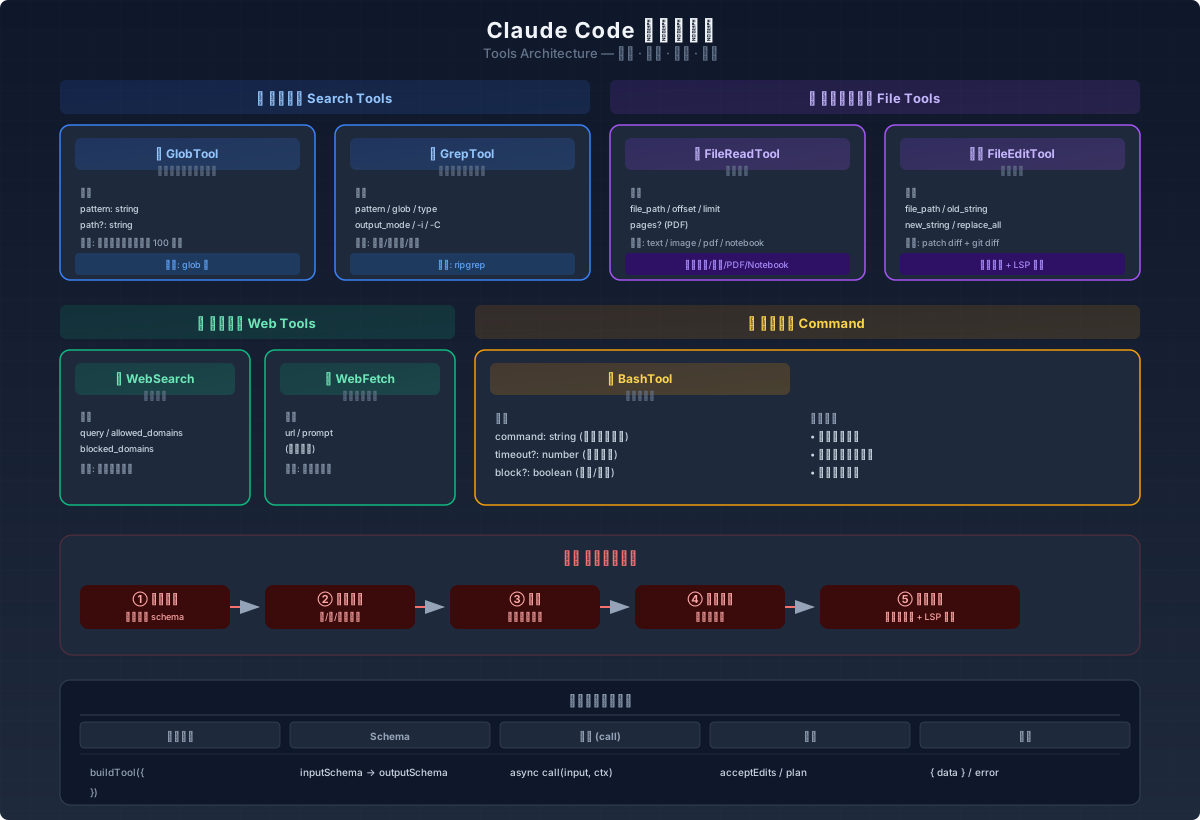
详解 Claude Code 内置工具集的使用方式、入参、输出格式和实现原理,涵盖文件搜索、内容读取、文本替换、命令行调用和网页内容获取等核心功能。
概述
Claude Code 提供了一系列强大的工具,帮助开发者高效地完成各种编程任务。这些工具覆盖了文件搜索、内容读取、文本替换和外部命令调用等核心功能。本文将详细介绍这些工具的使用方式、入参、输出格式和实现原理。
搜索工具
GlobTool(文件搜索)
功能:根据指定的模式匹配文件
入参:
{
  pattern: string;         // 要匹配的文件模式(支持通配符)
  path?: string;           // 搜索目录(默认为当前工作目录)
}
输出:
{
  durationMs: number;      // 执行时间(毫秒)
  numFiles: number;        // 找到的文件数量
  filenames: string[];     // 匹配的文件路径数组
  truncated: boolean;      // 结果是否被截断(限制为 100 个文件)
}
实现原理:
- 使用
glob库进行模式匹配 - 支持常见的通配符模式(如 .ts, **/.md)
- 结果会被截断为 100 个文件,避免返回过多结果
- 会对搜索路径进行权限检查,确保只能读取允许访问的文件
GrepTool(内容搜索)
功能:使用正则表达式在文件内容中搜索
入参:
{
  pattern: string;         // 要搜索的正则表达式
  path?: string;           // 搜索路径(默认为当前工作目录)
  glob?: string;           // 文件模式匹配(如 *.js, *.{ts,tsx})
  type?: string;           // 文件类型(如 js, py, rust)
  output_mode?: 'content' | 'files_with_matches' | 'count';  // 输出模式
  '-B'?: number;           // 匹配前显示的行数
  '-A'?: number;           // 匹配后显示的行数
  '-C'?: number;           // 匹配前后显示的行数(上下文)
  context?: number;        // 匹配前后显示的行数(与 -C 相同)
  '-n'?: boolean;          // 是否显示行号(默认为 true)
  '-i'?: boolean;          // 是否忽略大小写
  head_limit?: number;     // 结果限制(默认为 250)
  offset?: number;         // 结果偏移量(用于分页)
  multiline?: boolean;     // 是否支持多行模式
}
输出:
{
  mode: 'content' | 'files_with_matches' | 'count';  // 输出模式
  numFiles: number;        // 匹配的文件数量
  filenames: string[];     // 匹配的文件路径数组
  content?: string;        // 匹配的内容(仅在 content 模式下)
  numLines?: number;       // 匹配的行数(仅在 content 模式下)
  numMatches?: number;     // 匹配的次数(仅在 count 模式下)
  appliedLimit?: number;   // 应用的结果限制
  appliedOffset?: number;  // 应用的偏移量
}
实现原理:
- 使用
ripgrep库进行高性能搜索 - 自动排除版本控制目录(如 .git, .svn)
- 支持多种输出模式(内容、文件名、计数)
- 对搜索结果进行分页处理,避免返回过多内容
- 支持正则表达式的高级特性(如多行模式)
文件操作工具
FileReadTool(文件读取)
功能:读取文件内容(支持文本、图片、PDF、Jupyter Notebook)
入参:
{
  file_path: string;       // 要读取的文件路径(绝对路径)
  offset?: number;         // 起始行号(用于大文件读取)
  limit?: number;          // 要读取的行数(用于大文件读取)
  pages?: string;          // PDF 页面范围(如 "1-5")
}
输出:
{
  type: 'text' | 'image' | 'notebook' | 'pdf' | 'parts' | 'file_unchanged';
  file: {
    filePath?: string;     // 文件路径(文本和 Notebook)
    content?: string;      // 文件内容(文本)
    numLines?: number;     // 内容行数(文本)
    startLine?: number;    // 起始行号(文本)
    totalLines?: number;   // 总行数(文本)
    base64?: string;       // 二进制内容的 Base64 编码(图片、PDF)
    type?: string;         // 图片类型(如 image/png)
    originalSize?: number; // 文件原始大小(字节)
    dimensions?: {         // 图片尺寸信息(宽度、高度)
      originalWidth?: number;
      originalHeight?: number;
      displayWidth?: number;
      displayHeight?: number;
    };
    cells?: any[];         // Notebook 单元格(Jupyter Notebook)
    count?: number;        // 提取的页数(PDF)
    outputDir?: string;    // 提取页面的输出目录(PDF)
  };
}
实现原理:
- 根据文件扩展名判断文件类型
- 文本文件:直接读取并返回内容
- 图片:读取并压缩为 Base64 编码
- PDF:支持读取整个文件或指定页面
- Jupyter Notebook:解析为 JSON 格式并返回单元格
- 对大文件进行分词计数,避免返回过多内容
- 支持内容去重,避免重复读取同一文件
FileEditTool(文本替换)
功能:修改文件内容(支持精确匹配和替换)
入参:
{
  file_path: string;       // 要修改的文件路径
  old_string: string;      // 要替换的旧字符串
  new_string: string;      // 替换后的新字符串
  replace_all?: boolean;   // 是否替换所有匹配项(默认为 false)
}
输出:
{
  filePath: string;        // 文件路径
  oldString: string;       // 实际匹配的旧字符串(可能与输入不同)
  newString: string;       // 替换后的新字符串
  originalFile: string;    // 原始文件内容
  structuredPatch: any;    // 差异信息
  userModified?: boolean;  // 是否由用户修改过
  replaceAll: boolean;     // 是否替换了所有匹配项
  gitDiff?: any;           // Git 差异信息(如果可用)
}
实现原理:
- 验证文件是否已存在且可写入
- 检查权限,确保只能编辑允许修改的文件
- 使用字符串匹配和替换算法
- 处理引号规范化(如智能引号)
- 保存修改历史,支持撤销操作
- 通知 LSP 服务器和 VSCode 关于文件变化
网页内容获取工具
WebSearchTool(网页搜索)
功能:搜索网页内容,获取相关信息和链接
入参:
{
  query: string;                     // 要搜索的查询字符串(至少 2 个字符)
  allowed_domains?: string[];       // 只包含这些域名的搜索结果
  blocked_domains?: string[];       // 排除这些域名的搜索结果
}
输出:
{
  query: string;                     // 执行的搜索查询
  results: (SearchResult | string)[]; // 搜索结果(包含文本摘要和搜索结果对象)
  durationSeconds: number;          // 搜索持续时间(秒)
}

// SearchResult 类型
{
  tool_use_id: string;              // 工具使用 ID
  content: Array<{
    title: string;                  // 搜索结果标题
    url: string;                    // 搜索结果链接
  }>;
}
实现原理:
- 使用 Anthropic API 的 web_search_20250305 工具
- 支持搜索查询的自动生成和执行
- 处理搜索结果的解析和格式化
- 支持进度更新和取消操作
- 对搜索结果进行安全检查和过滤
支持的 API 提供商:
- firstParty:完全支持
- vertex:支持 Claude 4.0+ 模型(opus-4、sonnet-4、haiku-4)
- foundry:完全支持
使用示例:
// 搜索当前日期
const result = await WebSearchTool.call({
  query: "2026年5月27日的重要事件"
});

// 搜索特定领域的内容
const result = await WebSearchTool.call({
  query: "人工智能的最新发展趋势",
  allowed_domains: ["example.com", "techblog.org"]
});
WebFetchTool(网页内容获取)
功能:获取指定 URL 的内容并进行处理
入参:
{
  url: string;                      // 要获取的 URL(必须是有效的 URL)
  prompt: string;                   // 对获取内容的处理提示
}
输出:
{
  bytes: number;                    // 获取内容的大小(字节)
  code: number;                     // HTTP 响应代码
  codeText: string;                 // HTTP 响应文本
  result: string;                   // 处理后的结果
  durationMs: number;               // 执行时间(毫秒)
  url: string;                      // 实际获取的 URL
}
实现原理:
- 使用 fetch API 获取网页内容
- 将 HTML 转换为 Markdown 格式
- 使用 AI 模型对内容进行处理
- 支持预批准主机检查(避免访问受限制的网站)
- 处理重定向和错误情况
预批准主机:
- 某些主机名和路径是预批准的,可以直接访问
- 其他主机需要用户授权才能访问
使用示例:
// 获取网页内容并提取特定信息
const result = await WebFetchTool.call({
  url: "https://example.com/article",
  prompt: "提取文章的标题、作者和发布日期"
});

// 获取 API 文档并分析
const result = await WebFetchTool.call({
  url: "https://api.example.com/docs",
  prompt: "总结 API 的主要功能和使用方法"
});
外部工具调用
BashTool(命令行调用)
功能:执行外部命令(支持 Bash 命令)
入参:
{
  command: string;         // 要执行的命令
  timeout?: number;        // 超时时间(毫秒,默认为 60000)
  block?: boolean;         // 是否阻塞执行(默认为 true)
}
输出:
{
  stdout: string;          // 命令的标准输出
  stderr: string;          // 命令的标准错误
  code: number;            // 命令退出码(0 表示成功)
  durationMs: number;      // 执行时间(毫秒)
}
实现原理:
- 使用 Node.js 的
child_process模块执行命令 - 支持超时控制,防止命令无限期运行
- 对命令进行安全检查,防止潜在的恶意操作
- 支持实时输出和进度显示
- 管理命令的生命周期(启动、暂停、终止)
安全特性:
- 命令解析和安全检查
- 防止命令注入攻击
- 限制对敏感文件的访问
- 沙箱环境(可选)
- 命令白名单和黑名单
工具架构与设计原理
工具定义方式
所有工具都遵循统一的定义方式:
import { buildTool, type ToolDef } from '../../Tool.js';

export const MyTool = buildTool({
  name: 'my-tool',
  searchHint: 'brief description',
  async description() { return 'Detailed description'; },
  get inputSchema() { return schema; },
  get outputSchema() { return schema; },
  async call(input, context) {
    // 工具实现逻辑
    return { data: result };
  },
  // 其他配置...
} satisfies ToolDef<InputSchema, Output>);
权限检查
所有工具都会经过权限检查:
- 文件操作:检查是否有读/写权限
- 命令执行:检查是否有执行权限
- 权限模式:支持不同的权限级别(如 acceptEdits, plan)
工具执行流程
- 输入验证:对工具入参进行验证
- 权限检查:确认用户有执行该工具的权限
- 执行:运行工具的实现逻辑
- 输出处理:格式化工具输出
- 结果返回:将结果返回给用户
最佳实践
搜索文件
// 搜索所有 TypeScript 文件
await GlobTool.call({ pattern: '**/*.ts' });

// 搜索包含特定字符串的所有文件
await GrepTool.call({
  pattern: 'function buildTool',
  type: 'ts'
});

// 搜索特定目录下的文件
await GlobTool.call({
  pattern: '*.md',
  path: '/Users/user/docs'
});
读取和修改文件
// 读取文件内容
const result = await FileReadTool.call({
  file_path: '/Users/user/project/src/main.ts'
});

// 修改文件内容
await FileEditTool.call({
  file_path: '/Users/user/project/src/main.ts',
  old_string: 'function buildTool',
  new_string: 'function createTool',
  replace_all: true
});
执行外部命令
// 检查 git 状态
const result = await BashTool.call({
  command: 'git status'
});

// 安装依赖
await BashTool.call({
  command: 'npm install'
});

// 执行自定义脚本
await BashTool.call({
  command: './scripts/deploy.sh'
});
网页内容获取
// 搜索相关信息
const searchResult = await WebSearchTool.call({
  query: "Claude Code 工具使用指南"
});

// 获取特定网页内容
const fetchResult = await WebFetchTool.call({
  url: "https://example.com/claude-code-tools",
  prompt: "提取关于工具使用的详细信息"
});

// 组合使用搜索和获取工具
const searchResult = await WebSearchTool.call({
  query: "人工智能最新研究进展"
});

if (searchResult.results.length > 0) {
  const firstResult = searchResult.results.find(r => typeof r !== 'string');
  if (firstResult) {
    const fetchResult = await WebFetchTool.call({
      url: firstResult.content[0].url,
      prompt: "总结这篇文章的核心观点"
    });
  }
}
总结
Claude Code 提供的工具集为开发者提供了强大的编程辅助功能。通过了解这些工具的使用方式和实现原理,开发者可以更高效地完成各种任务,提高开发效率。这些工具覆盖了文件搜索、内容读取、文本替换、外部命令调用以及网页内容获取等核心功能,是开发过程中不可或缺的一部分。
特别值得关注的是:
- WebSearchTool 提供了强大的网页搜索功能,支持自定义搜索参数和结果过滤
- WebFetchTool 允许开发者获取和处理特定网页的内容,支持预批准主机检查
- 所有工具都经过严格的权限检查,确保安全性和可靠性
- 统一的工具架构使得扩展和维护变得简单
这些工具的结合使得 Claude Code 不仅能够处理本地文件和命令,还能够与外部资源进行交互,为开发者提供了更全面的编程辅助支持。
官方文档参考:Claude Code 工具参考
原文链接: Claude Code 工具使用指南与实现原理 ,转载请注明来源!
– EOF –